
What players say
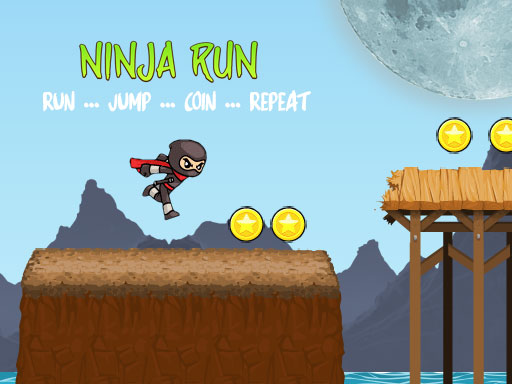
Shadow Dash offers a clean and enjoyable running experience. The simple tap-to-jump controls are easy to learn, and the increasing difficulty keeps the challenge alive. Coin collection adds a rewarding goal, while fullscreen support makes it great for mobile and desktop. It is ideal for short breaks or longer play sessions.
About this game
Game Introduction
Shadow Dash is an engaging endless running game designed for players of all ages. The core objective is to guide a shadow runner as they move forward on a mission to reach their destination. Players must time jumps carefully to avoid obstacles that appear along the path. The game offers a straightforward yet rewarding experience: collect shiny coins to increase your score while navigating an ever-changing course. Designed to work seamlessly on both mobile devices and desktop computers, Shadow Dash supports fullscreen mode for an immersive experience. The game is built for quick gaming sessions, with non-intrusive ad timings that allow you to focus on the action without interruptions. Whether you are a casual player looking for a fun distraction or a fan of running games, Shadow Dash delivers pure entertainment. The increasing difficulty ensures that the challenge grows as you improve, making each run feel fresh and exciting. The clean visuals and simple controls make it easy to pick up and play, while the coin collection adds a rewarding goal to strive for. This game is perfect for short breaks or longer sessions, offering endless fun with every play.
How to Play
To play Shadow Dash, you tap or click to make the shadow runner jump. The key is to time your jumps perfectly to avoid obstacles that appear on the path ahead. As you progress, the speed may increase, requiring quicker reactions. Collecting coins along the way boosts your score and adds a sense of achievement. The game is easy to learn but challenging to master, as obstacles become trickier over time. For the best experience, enable fullscreen mode by using the appropriate settings on your device. The controls are responsive and smooth, whether you are playing on a phone, tablet, or computer. There is no need for complex instructions—just tap and jump to keep moving forward.
Game Features
Shadow Dash includes fullscreen support for an immersive play experience. The game is mobile-friendly, designed to work well on phones and tablets. Non-intrusive ad timings keep the focus on gameplay without distractions. Simple one-tap controls make it easy to pick up and play. The increasing difficulty provides a steady challenge as you improve your skills. The coin collection mechanic adds a rewarding goal to each run. The clean visuals and smooth performance ensure an enjoyable experience across different devices.
Tips for Success
Practice your timing to avoid obstacles and keep moving forward. Focus on collecting coins whenever possible to maximize your score. As the speed increases, stay alert and react quickly. Regular practice will help you learn the rhythm of the obstacles. Enjoy the game in short sessions to maintain concentration and improve your performance.




03 Player Comments
Sign in to comment
You must be logged in before posting a review or rating.
No account? Create one
No comments yet. Be the first to comment!